Rebuilds just got 10x faster.
AIRA is an ACF blocks migration tool by RDH Digital Ltd — an AI ACF blocks importer that helps agencies convert content to ACF blocks on client rebuilds.
The AI ACF blocks importer crawls your old site to migrate your website to ACF Gutenberg blocks — classifying every section using your ACF JSON export as the map. Review the result and import as drafts, with media, links and SEO handled for you. 1 credit = 1 page, in minutes instead of days.
Convert content to ACF blocks — automatically
AIRA is the ACF blocks migration tool agencies use to convert content to ACF blocks on every rebuild — crawl, classify, review, and import, without the soul-destroying copy-and-paste.
AI Mapping Spec
Upload your target site's ACF field-group export and AIRA builds a mapping spec — learning every placeable block, field key, and repeater. AI labels atomic vs composite blocks and writes the trigger rules that decide what goes where.
Old-Site Crawler
Point AIRA at the old URL to get automatic ACF blocks from your existing site. It discovers the sitemap, crawls each page, and classifies every section into your blocks — with include/exclude path filters and a max-pages cap so you only migrate what matters.
Review & Import as Drafts
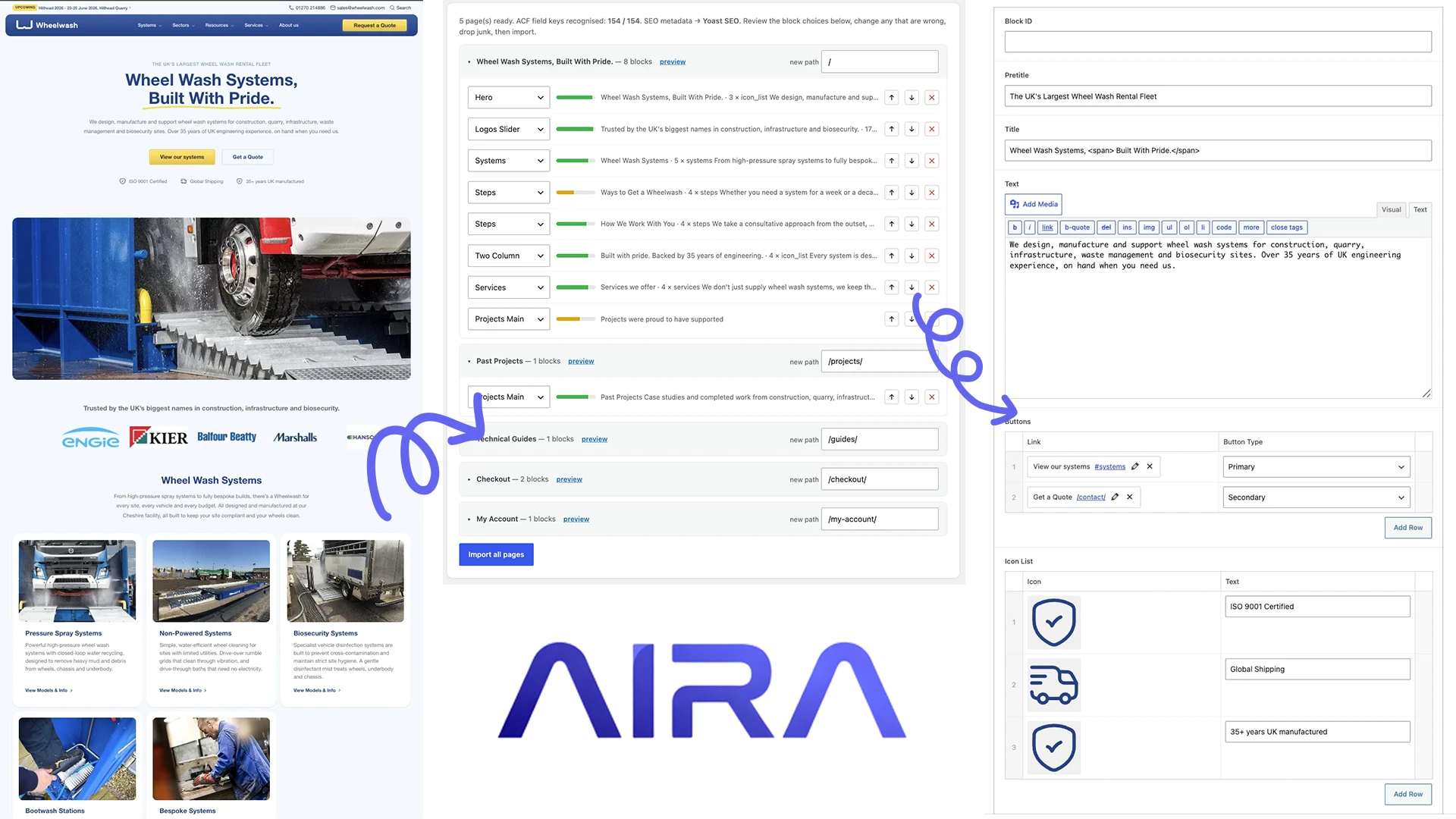
Every block arrives with a confidence score and review flags. Reassign a block type, reorder, or drop junk in the review screen — then import as drafts so nothing goes live until you say so.
Media & Link Rewriting
AIRA sideloads images straight into your Media Library and rewrites internal links from old URLs to your new page paths automatically — so the rebuilt site isn't riddled with broken links.
Native ACF Blocks
AIRA builds real Gutenberg blocks with WordPress's own serialize_block() against your registered ACF block library — hero, cards, stats, FAQs, galleries and more — using the exact field keys from your export.
SEO & Redirects
Page titles, meta descriptions and canonicals are migrated into Yoast or Rank Math, and AIRA generates a redirect map (old → new) you can drop straight into Redirection or your .htaccess.
From old site to perfect ACF structure
Three simple steps. Upload your structure, point AIRA at the old content, and review the AI-mapped result before you spend a single credit.
Generate your mapping spec
Upload your new site's ACF field-group export (ACF → Tools → Export As JSON). AIRA reads your whole block library and, with AI, labels each block and writes the trigger rules that make mapping accurate.
Crawl the old site
Paste the old URL. AIRA discovers the sitemap, crawls each page, and classifies every section into your ACF blocks — returning a bundle with per-block confidence scores and anything that needs a second look flagged.
Commit, download & import
Commit the finished run to download bundle.json (1 credit per page). Open it in the ACF Migrate plugin, fix any low-confidence blocks, and import as drafts — images sideloaded, links rewritten, SEO migrated.
Ready to try it?
Migrate your first 10 pages free.
10 free credits every month. No card required.
You stay in control of every block
The ACF Migrate review screen shows every block with a confidence score. Reassign a block type, reorder, drop the junk, edit the new page path — then import as drafts. Nothing goes live until you publish it.
Migrate a 60-page site for less than the cost of 2 hours of your time.
The maths is hard to argue with
Copying content into ACF by hand is slow, repetitive, and error-prone. Here is the same rebuild, done both ways.
| The job | Manual | AIRA |
|---|---|---|
| Time to migrate one page | 10–20 min | Seconds |
| A typical 60-page rebuild | 2–3 days | Under an hour |
| Mapping content to ACF blocks | Manual copy-paste | AI-classified automatically |
| Importing images & galleries | Download + re-upload | Sideloaded automatically |
| Internal links & redirects | Fix by hand | Rewritten + redirect map |
| SEO meta (Yoast / Rank Math) | Re-enter manually | Migrated for you |
| Review before publishing | remove | check_circle |
| Cost of a 60-page site | Hours of dev time | ~£47 in credits |
Try AIRA risk-free
Sign up at app.wpaira.com and get 10 free credits a month — enough to migrate a small site before you pay a penny. No card required. Crawl and classify for free; you only spend a credit when you commit and download your bundle.
What is an ACF blocks migration tool?expand_more
Can AIRA convert content to ACF blocks automatically?expand_more
What exactly is a credit?expand_more
What does AIRA build, and what do I need on the new site?expand_more
How does AIRA know where my content should go?expand_more
Do unused credits roll over?expand_more
What happens if I run out of credits mid-project?expand_more
Ready to rebuild 10x faster?
Start with 10 free credits every month. Upload your ACF JSON, point AIRA at the old site, and watch your new blocks fill themselves in — in minutes, not days.
Free plan forever. Paid plans from £29/month. Extra credits always 79p each.