Migrating from Flatsome & UX Builder to ACF blocks
Flatsome is everywhere on WooCommerce sites. This in-depth guide covers migrating UX Builder content to native ACF blocks — shortcodes, shop pages, and the…
verifiedReviewed by Tommy Smith,Content Director
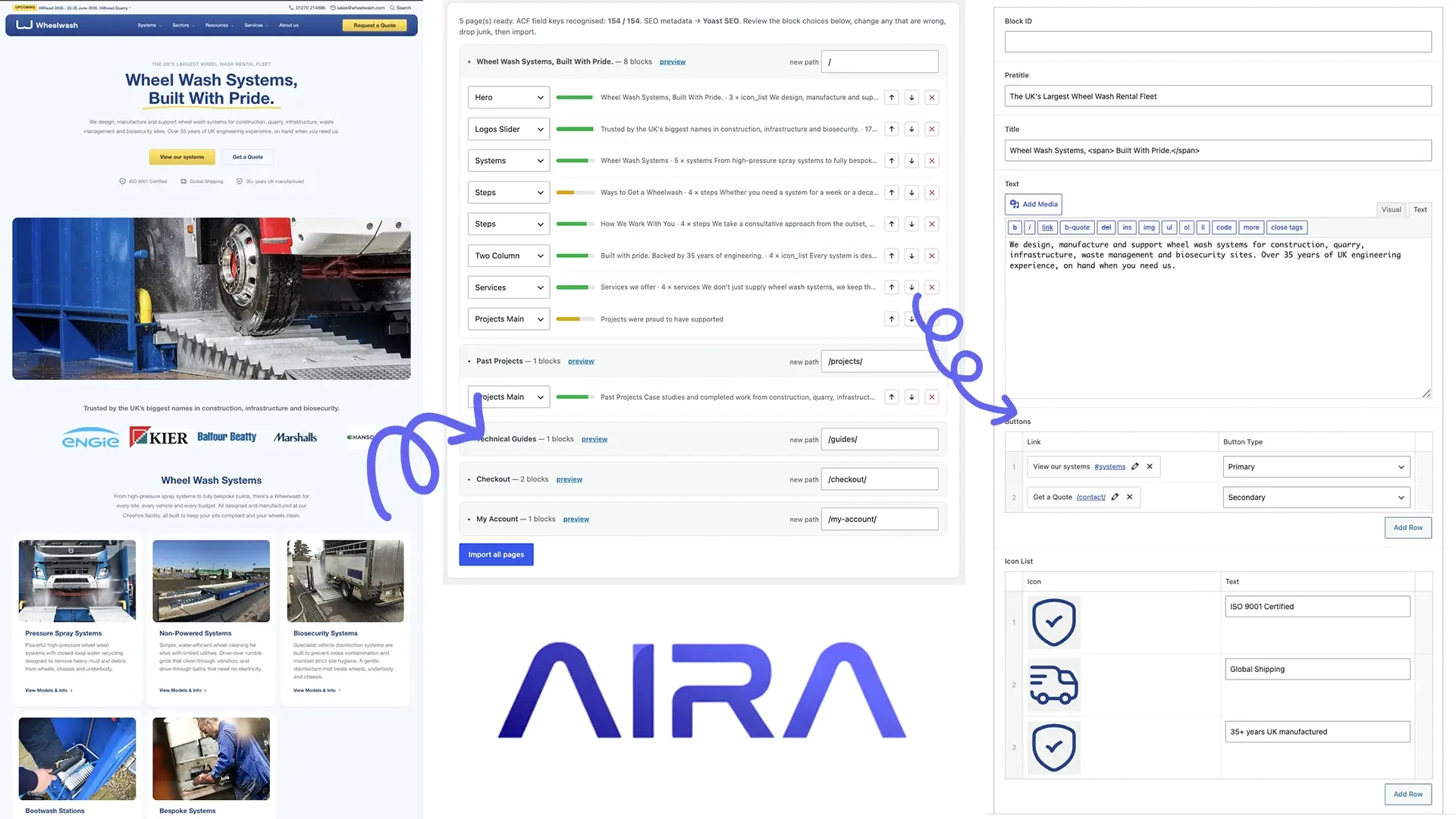
Flatsome UX Builder stores layouts as shortcodes in post_content — deactivate Flatsome and pages break. Crawl rendered pages while Flatsome is live, map sections to ACF blocks, rebuild WooCommerce templates separately, keep product data in place, and QA checkout before removing the theme.
Flatsome is one of the most-installed WooCommerce themes on the market — fast to launch, packed with shop layouts, and powered by UX Builder, its own shortcode-based page builder. Agencies inherit Flatsome client sites constantly: the shop works, the homepage looks fine, but the client wants a bespoke brand rebuild that isn't tied to a £59 theme and its option panels. That rebuild means extracting content from UX Builder shortcodes and landing it in an ACF block library, while WooCommerce product data largely stays put.
What UX Builder does to your content
UX Builder stores layouts as shortcodes in post_content — [ux_banner], [ux_slider], [ux_products], [section], [row], [col] and many more. Like WPBakery or Avada's Fusion Builder, deactivate the theme and those shortcodes stop rendering. The WooCommerce catalogue (products, categories, orders) lives in separate tables and survives a theme change — but your homepage hero, category landing pages and 'about us' story are all in UX Builder markup.
Pages agencies most often need to migrate
- arrow_rightHomepage: banner sliders, featured categories, product grids, testimonials — usually the densest page.
- arrow_rightAbout, contact, FAQ and policy pages built in UX Builder.
- arrow_rightCustom landing pages for campaigns or seasonal promotions.
- arrow_rightBlog posts are often standard Gutenberg or Classic Editor — lower migration cost unless UX Builder was used on posts too.
- arrow_rightShop archive and single product templates: these come from Flatsome's WooCommerce overrides, not UX Builder page content — rebuild as theme templates on the new site.
UX Builder elements and how they map
Every agency's ACF block library is different, but Flatsome sites repeat the same UX patterns. Use this as a starting point for your mapping spec — adjust to your actual block names.
| UX Builder element | Typical ACF block target | Watch out for |
|---|---|---|
| ux_banner / ux_image | Hero block | Text overlay, mobile crop, link URL |
| ux_slider | Hero slider or gallery block | Each slide is a repeater row |
| ux_products | Product grid block or Woo shortcode | May need live WooCommerce query, not static copy |
| ux_banner_grid | Card grid / features block | Image + text + link per cell |
| ux_logo | Logo strip repeater | SVG vs PNG, retina sources |
| ux_testimonial | Testimonial block | Avatar images, star ratings |
| text_box / plaintext | Text / rich text block | Inline HTML cleanup |
WooCommerce-specific considerations
Product grids that must stay dynamic
A [ux_products] block showing 'latest 8 products' isn't static content — it's a query. On the new site, rebuild it as a WooCommerce block, a custom ACF block with a WP_Query, or a shortcode your theme provides. Don't migrate it as a frozen HTML snapshot unless the client explicitly wants static.
Category and shop pages
Flatsome overrides WooCommerce templates heavily. Your new theme needs equivalent shop/archive/single-product templates before launch. Product URLs usually stay the same (/product/product-name/) so redirects are often minimal for the catalogue — but verify category slug changes.
Cart, checkout and account
These are WooCommerce endpoints, not UX Builder pages. Test them after the theme swap on staging: cart adds, coupon codes, payment gateway, transactional emails. A beautiful migrated homepage means nothing if checkout throws a fatal error.
Migration workflow
- 1Register ACF blocks on the new theme; export field groups as JSON.
- 2Crawl indexable UX Builder pages from the live Flatsome site (production URL, not a stale staging copy).
- 3Classify sections; flag [ux_products] and any dynamic elements for developer handling.
- 4Import static content pages as drafts; sideload images and rewrite internal links.
- 5Rebuild WooCommerce templates; wire product grid blocks to live queries.
- 6Run the full QA checklist including checkout and forms.
- 7Redirect map for any non-product URLs that changed; preserve Yoast or Rank Math metadata.
Flatsome's shortcode model is closest to WPBakery and Avada migrations. The WooCommerce layer is the extra depth — get the shop flow right and the marketing pages are the familiar crawl-and-map work.
Flatsome theme options and global elements
UX Builder pages are only part of Flatsome — header layout, footer widgets, shop catalogue customisations and Flatsome's theme options panel control global behaviour. Audit sticky header, mobile menu, and catalog mode settings before decommissioning. Your new theme must replicate cart icon placement, account links, and mobile drawer UX or conversion drops before SEO does.
Performance after leaving Flatsome
Flatsome ships substantial CSS/JS even on lean pages. Native ACF blocks typically improve LCP and TBT measurably — document before/after Lighthouse scores for the client handover. Image-heavy ux_banner sliders are common culprits; compress during migration. See page builder performance for the broader case against builder runtimes.
Handover for store owners
Flatsome clients edit in UX Builder for homepage promos — train them on your ACF promo block instead. Document how to swap hero slides, feature a product category, and update sale banners without touching PHP. A one-page edit guide prevents support tickets in week one after launch.
Flatsome theme options versus UX Builder pages
Flatsome stores global design decisions — typography, colours, header layout, shop catalog mode — in theme options and Customizer settings, not in UX Builder shortcodes. A new ACF block theme replaces both layers. Map theme options to your design tokens during the design phase; do not expect a page crawl to capture header behaviour, sticky nav settings, or mobile menu breakpoints. Clients conflate 'the site looks wrong' after launch with migration failure when the issue is unmapped theme options.
- arrow_rightExport screenshots of Flatsome Customizer settings for header, footer, and shop layout.
- arrow_rightDocument mobile-specific UX Builder rows — Flatsome often hides columns on small screens.
- arrow_rightCatalog mode, quick view, and AJAX cart are WooCommerce + Flatsome features — rebuild in new theme templates.
- arrow_rightFlatsome's built-in lazy load and image sizing differ from your theme — plan a Regenerate Thumbnails pass.
UX Builder shortcodes in widgets and footers
Flatsome sites accumulate ux_ shortcodes in footer widget areas, top bars, and block-based widget zones — not just primary pages. A page-only crawl misses these entirely. Before deactivating Flatsome, search wp_options for widget entries and wp_postmeta for ux_ strings. Footer contact columns, newsletter sign-ups, and trust badges often live here. Rebuild in block-based widget areas or template parts on the new theme.
Mobile layouts and responsive UX Builder rows
UX Builder rows carry responsive visibility flags — content that exists on desktop but hides on mobile, or stacks differently at breakpoints. Crawlers capture the rendered viewport they use; verify mobile separately on your top ten URLs. A hero that looks correct on desktop crawl may lose half its content on mobile if visibility rules hid sections. Run a mobile crawl pass or manual device check on homepage, shop archive, and top landing pages before sign-off.
Flatsome portfolio and lookbook integrations
Flatsome's portfolio and lookbook features often combine UX Builder archive pages with custom post types or Flatsome-specific content types. Portfolio singles may be standard posts with a category, dedicated portfolio CPT entries, or UX Builder pages linked from a grid shortcode. Identify the data model before quoting — CPT migration applies when /work/ or /portfolio/ URLs are CPT-driven, not UX Builder pages.
| Pattern | How to identify | Migration approach |
|---|---|---|
| Portfolio CPT + UX archive | Custom post type in admin; /work/slug/ URLs | Crawl singles + rebuild archive template |
| Blog category as portfolio | Posts in 'Portfolio' category | Migrate posts; rebuild grid as ACF query block |
| Pure UX Builder grid | Manual pages linked from [ux_banner_grid] | Crawl each linked page individually |
Checkout and shop template cutover
WooCommerce cart, checkout, and account pages use Flatsome template overrides that break when the theme changes — often before you touch marketing pages. Stand up WooCommerce templates on the new theme early and test add-to-cart, coupon codes, and payment gateway on staging. Product URLs usually stay stable; checkout regression loses revenue on launch day. Pair with WooCommerce ACF rebuild for the full shop scope.
What to read next on this rebuild
Flatsome shop pages are WooCommerce templates, not UX Builder content — pair this guide with WooCommerce ACF rebuild. Marketing pages with ux_ shortcodes need shortcode cleanup after import. Product URLs usually stay stable; focus redirects on homepage and campaign landers via the redirect map guide.
Frequently asked questions
Do I need to migrate WooCommerce products?expand_more
Usually no — products, orders and customer data stay in the database across a theme change on the same WordPress install. You're migrating UX Builder page content and rebuilding WooCommerce templates. A full site move to a new install is a different project that includes product export/import.
Can I keep Flatsome and only migrate a few pages?expand_more
You can run a hybrid temporarily, but two page-building systems (UX Builder + ACF blocks) confuses editors and doubles maintenance. Agencies typically migrate all marketing pages in one pass when rebuilding the theme.
Will Flatsome sliders migrate as one block or many?expand_more
A ux_slider should become a repeater in your hero slider block — one row per slide with image, heading, text and link sub-fields. If your block library only has a single-image hero, extend it before migration or you'll lose slides.
Can I keep Flatsome for the shop and use ACF blocks for marketing pages?expand_more
Technically yes on a child theme setup, but dual-theme architectures confuse editors and duplicate asset loads. Most agencies migrate marketing pages to ACF blocks on a new theme, then cut over WooCommerce templates in the same launch — one theme, one editor experience.
Do Flatsome UX Builder global blocks migrate?expand_more
UX Builder global blocks (reusable sections) behave like Thrive symbols — shared across pages. Inventory them separately; crawl one instance and apply the mapping consistently to every page that references the global block.
What about Flatsome mega menus?expand_more
Mega menus are theme-level, not page content. Rebuild navigation in WordPress menus with a mega menu plugin or custom walker on the new theme. Screenshot Flatsome menu structure before cutover — clients remember where items lived.
Will product galleries built with ux_products shortcodes migrate?expand_more
The shortcode renders a live WooCommerce query — crawl captures the visible products at crawl time, not a dynamic query. Replace with a WooCommerce product grid block or ACF block that queries products by category. Static crawl output is a snapshot, not a maintained feed.
How long should a typical Flatsome marketing migration take?expand_more
Exclude WooCommerce template work: a 25-page UX Builder marketing site often runs two to four dev-days for crawl, review, and import with AIRA, plus one day for widgets and footer cleanup. Add shop template rebuild separately — often three to five additional days.

Ryan Hale
Head of Front End Development
Ryan Hale is Head of Front End Development at AIRA, where he leads the team building the engine that migrates WordPress sites into native ACF blocks. He has spent more than a decade building and rebuilding WordPress sites for agencies, with deep, hands-on expertise in Advanced Custom Fields, Gutenberg block development, and large-scale content migrations that protect search rankings. He writes about ACF, moving off page builders like Elementor and Divi, and the practical craft of shipping fast, maintainable WordPress rebuilds.
Reviewed to our editorial guidelines.



