How to migrate from Wix to WordPress (and into ACF blocks)
A complete, practical guide to migrating a Wix site to WordPress and into native ACF blocks — why Wix has no real export, how to migrate from the rendered…
verifiedReviewed by Tommy Smith,Content Director
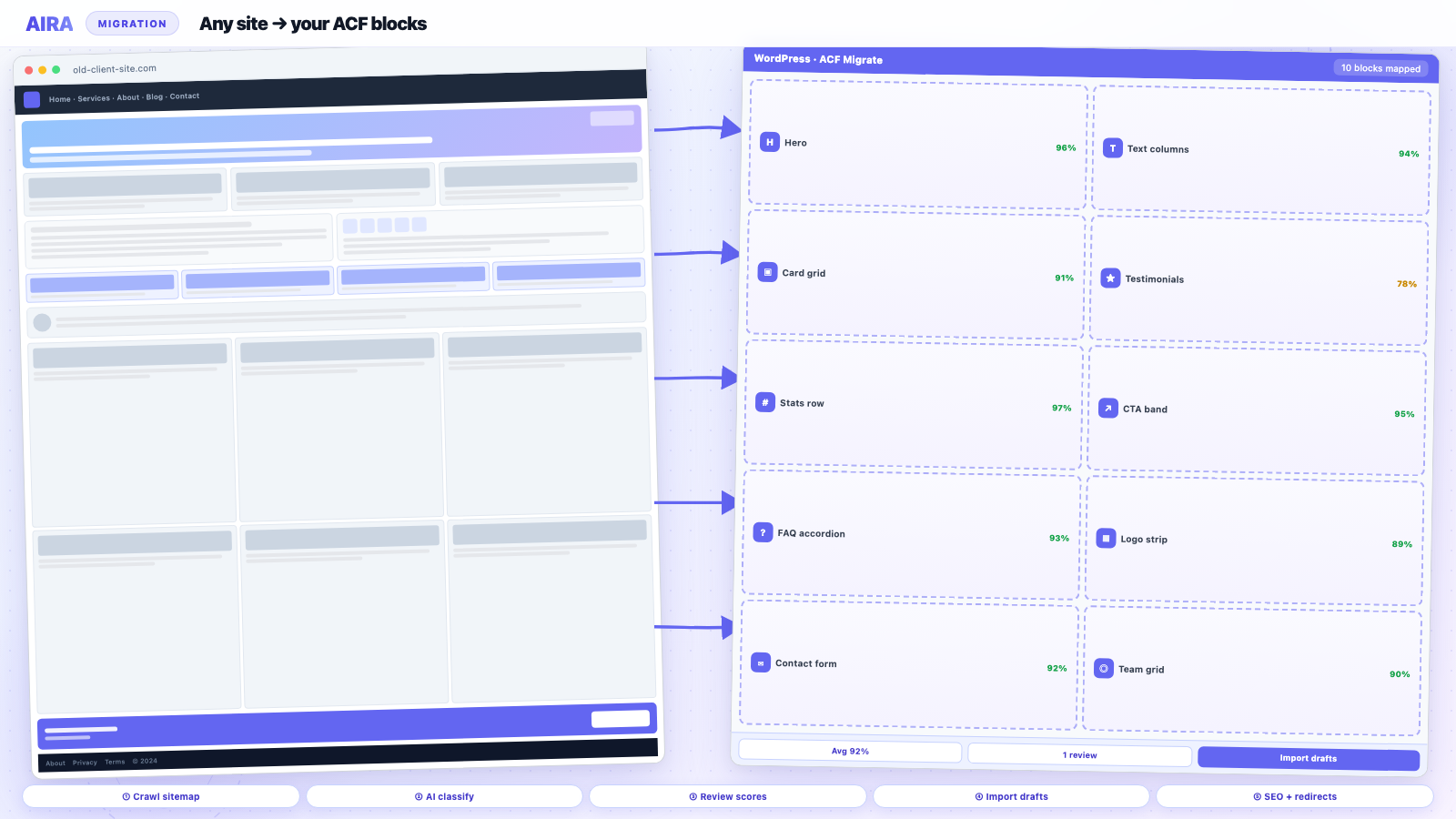
Wix has no full export, so you migrate from the rendered front-end, not a file. Build your ACF blocks, crawl the live Wix site to classify each section into those blocks, import as drafts, then map Wix's /post-style URLs to your new structure with 301 redirects. The platform doesn't matter — AIRA reads the page a visitor sees.
Moving a site from Wix to WordPress is one of the most common — and most misunderstood — migrations agencies are asked to do. Clients outgrow Wix for predictable reasons: they want to own their site, they need real SEO control, they've hit the ceiling on customisation, or they simply can't move a Wix site to a new host because Wix is a closed, hosted platform. The catch is that Wix gives you almost nothing to take with you. Unlike WordPress-to-WordPress moves, there's no database to export and no clean content file. This guide covers what that actually means in practice and how to run a clean Wix-to-WordPress migration that lands in native ACF blocks.
Why teams leave Wix for WordPress
- arrow_rightOwnership — Wix is fully hosted and closed; you can't take the site to another host or fully control the code.
- arrow_rightSEO control — limited access to URL structure, redirects, schema and technical SEO compared with WordPress.
- arrow_rightCustomisation ceiling — bespoke layouts, integrations and content models are far easier on WordPress with ACF.
- arrow_rightPerformance and longevity — a WordPress build on native blocks is leaner and isn't tied to one vendor's roadmap or pricing.
The hard truth: Wix has no real export
This is the single most important thing to understand before you quote a Wix migration. Wix does not offer a full site export. You can pull blog posts out via an RSS feed, and you can download your media if you saved it, but your pages, their layouts, and most structured content cannot be exported as a file you import into WordPress. There is no WXR, no database dump, no JSON of your pages. Anyone promising a one-click "Wix importer" is, at best, scraping the public site for you.
That sounds like bad news, but it's actually clarifying: because the only reliable source of truth is the rendered page, the right approach is to read the live site exactly as a visitor (and a search engine) sees it, and map each section into your new WordPress blocks. This is the same "any site" approach that works for Webflow and static sites — the source platform is irrelevant once you're reading the rendered DOM.
The clean Wix-to-WordPress workflow
- 1Build your WordPress site and register your ACF block library first — hero, cards, testimonials, FAQ, CTA, and so on. Export the field groups as JSON so there's a clear target structure.
- 2Crawl the live Wix site. A crawler that reads the rendered DOM captures the headings, copy, images and links Wix outputs — including content that only appears after the page's JavaScript runs.
- 3Classify each section into your ACF blocks. Composite sections (a feature row, a testimonial band) map to matching blocks; anything ambiguous falls back to an editable text block so nothing is lost.
- 4Import as drafts and review. Confirm the block choices, sideload images into the Media Library, and fix anything flagged before you publish.
- 5Map the URLs and set 301 redirects — the step that protects your rankings (more below).
If you want the full end-to-end version of this process — the app, the spec, the review screen and the importer — it's written up in how to use AIRA.
Watch out for JavaScript-rendered content
Wix renders a lot of content with JavaScript after the initial page load. A naive scraper that only reads the raw HTML response will miss it and come back with half-empty pages. The fix is to migrate from the fully rendered page — the DOM as it exists after scripts run — which is what a proper crawler reads. It's worth spot-checking a few of your most complex Wix pages early to confirm the dynamic sections (sliders, tabs, galleries) are being captured before you commit to the full run.
Don't lose your SEO: Wix URLs and redirects
Wix uses its own URL conventions — blog posts often sit under /post/, and some pages carry Wix-specific path segments. When you rebuild on WordPress you'll almost certainly change those URLs to a cleaner structure, which means every old URL needs a 301 redirect to its new home or you'll lose the rankings and backlinks tied to it.
- arrow_rightCrawl the old site first to capture a complete list of indexable Wix URLs — that's your redirect spine.
- arrow_rightMap each old URL to its new WordPress path, and generate a 301 redirect map (old → new).
- arrow_rightCarry over page titles, meta descriptions and canonicals into your SEO plugin rather than regenerating them.
- arrow_rightRebuild any structured data, and resubmit your sitemap in Search Console after launch.
What about the blog and images?
Wix blog posts can be pulled via RSS, but the feed is partial and won't include your layout or every field you care about — so it's usually cleaner to migrate posts the same way as pages, from the rendered site. Images are the other common snag: migrate them by sideloading from the rendered page into your WordPress Media Library, and check for any that fail (Wix serves images from its own CDN, and a few may need re-hosting). A good importer attaches each image to the correct ACF image or gallery field automatically.
Wix is one of several closed platforms agencies migrate away from — the same approach covers the rest, and you'll find them all in the page builder migration hub.
Wix Apps, Velo and dynamic content
Wix Apps — stores, bookings, events, forums — add dynamic behaviour that a page crawl captures as static HTML snapshot, not as live functionality. Wix Velo (formerly Corvid) custom code can inject content after load that crawlers miss if JavaScript execution is incomplete. Inventory every Wix App during discovery; map each to a WordPress plugin equivalent before quoting. A Wix Stores product grid crawl gives product copy and images — not inventory sync, variants, or checkout.
- arrow_rightWix Stores → WooCommerce — product CSV plus marketing page crawl; see Shopify migration patterns.
- arrow_rightWix Bookings → Amelia, Bookly, or Calendly embed — rebuild scheduling flow.
- arrow_rightWix Blog → standard posts via crawl or RSS cross-check.
- arrow_rightWix Members Area → membership plugin phase — not included in marketing crawl.
Wix Editor X versus classic Wix Editor
Editor X sites use responsive CSS grid — generally cleaner DOM for section classification than classic absolute-positioned elements. Classic Wix Editor mobile layouts sometimes differ substantially from desktop; verify both viewports on homepage and primary conversion pages. Editor X breakpoints are closer to standard web practice — still spot-check, but classification confidence tends higher in our experience.
Domain, DNS and Wix cancellation sequence
Wix sites often use Wix-managed DNS — moving to WordPress requires pointing the domain to new hosting before or during cutover. Sequence: WordPress staging complete and QA passed, redirects imported to production WordPress, lower TTL, update DNS A/AAAA records, verify SSL on new host, monitor for 48 hours, then cancel Wix subscription — not before. Cancelling Wix early kills image CDN URLs still referenced in draft content.
- 1Export client list from Wix email tools if applicable — Wix marketing lists do not migrate automatically.
- 2Screenshot Wix SEO settings and connected Google properties for baseline.
- 3Point domain to WordPress host; confirm SSL certificate active.
- 4Test redirects from top Wix URLs — /post/slug/ patterns often change to /blog/slug/.
- 5Submit new sitemap; keep Wix site live with redirects only if dual-hosting during transition.
Wix multilingual and international sites
Wix Multilingual creates subdirectories or subdomains per language — each locale needs crawl with path filter and hreflang planning on WordPress. WPML or Polylang setup precedes content import when rebuilding bilingual sites — register post types and taxonomies per language before bulk import. Redirect maps need locale-specific rows; never cross-redirect English URLs to French content without hreflang.
Scoping Wix migrations honestly in proposals
Wix migrations are rebuilds, not imports. Quote theme and ACF block library, per-page migration credits, forms rebuild, redirect implementation, and QA separately. Clients who chose Wix for DIY editing need training on Gutenberg — include a handover session. Compare credit cost to manual hours using migration time benchmark data when technical stakeholders question tooling line items.
What to read next on this platform move
Wix has no real export — treat crawl-and-map as the primary path, same as Webflow. Wix blogs can bulk-import via RSS but layout-heavy pages need section mapping into ACF blocks. After cutover, run post-launch monitoring — Wix URL patterns often surprise you in Search Console week two.
Frequently asked questions
Can you export a Wix site to WordPress?expand_more
Not as a complete file. Wix offers no full export — you can pull blog posts via RSS and download saved media, but pages and layouts can't be exported. The reliable approach is to migrate from the rendered live site and map each section into WordPress blocks.
Will I lose my SEO moving from Wix to WordPress?expand_more
Only if you skip redirects. Because your URL structure will change, every old Wix URL needs a 301 redirect to its new WordPress path, and you should carry over titles, meta descriptions and canonicals. Done properly, rankings hold and usually improve with WordPress's better technical SEO.
How long does a Wix to WordPress migration take?expand_more
The build (theme and ACF blocks) is the fixed cost; content migration scales with page count. Reading and classifying the live Wix site into your blocks turns the slow part — manual copy-paste — into a review-and-publish job, so a typical small-business site is days rather than weeks.
Can Wix RSS feed replace crawling blog posts?expand_more
RSS gives partial post text without layout — useful as a cross-check, not primary migration. Design-led posts with pull quotes, inline images, and custom sections need rendered-page crawl into ACF blocks for structure preservation.
How do Wix ADI sites differ from Editor sites for migration?expand_more
ADI (Artificial Design Intelligence) sites have simpler structure but less editor control — crawl usually captures content cleanly. Editor and Editor X sites have richer layouts requiring more block mapping review. Discovery question: which Wix product built the site.
Will Wix email marketing contacts transfer to WordPress?expand_more
Export contacts from Wix before cancellation — CSV to Mailchimp, Klaviyo, or FluentCRM on WordPress. Email marketing is separate from site content migration; scope explicitly or client loses subscriber lists.
What about Wix logo and brand assets?expand_more
Download vector logos and brand kits from Wix media manager before account closure. Crawl sideloads raster images from rendered pages; SVG logos in headers may need manual upload if served from Wix CDN paths.
Does Google Analytics history transfer from Wix?expand_more
If the client used the same GA property on Wix, history continues after updating the tracking snippet on WordPress — annotate launch date. Wix-native analytics ends when the site is cancelled; export reports for baseline comparison.

Ryan Hale
Head of Front End Development
Ryan Hale is Head of Front End Development at AIRA, where he leads the team building the engine that migrates WordPress sites into native ACF blocks. He has spent more than a decade building and rebuilding WordPress sites for agencies, with deep, hands-on expertise in Advanced Custom Fields, Gutenberg block development, and large-scale content migrations that protect search rankings. He writes about ACF, moving off page builders like Elementor and Divi, and the practical craft of shipping fast, maintainable WordPress rebuilds.
Reviewed to our editorial guidelines.



