Migrating from Webflow to WordPress & ACF blocks
Moving a client site off Webflow onto WordPress with native ACF blocks? How Webflow sections map to blocks, CMS collection handling, and the agency workflow…
verifiedReviewed by Tommy Smith,Content Director
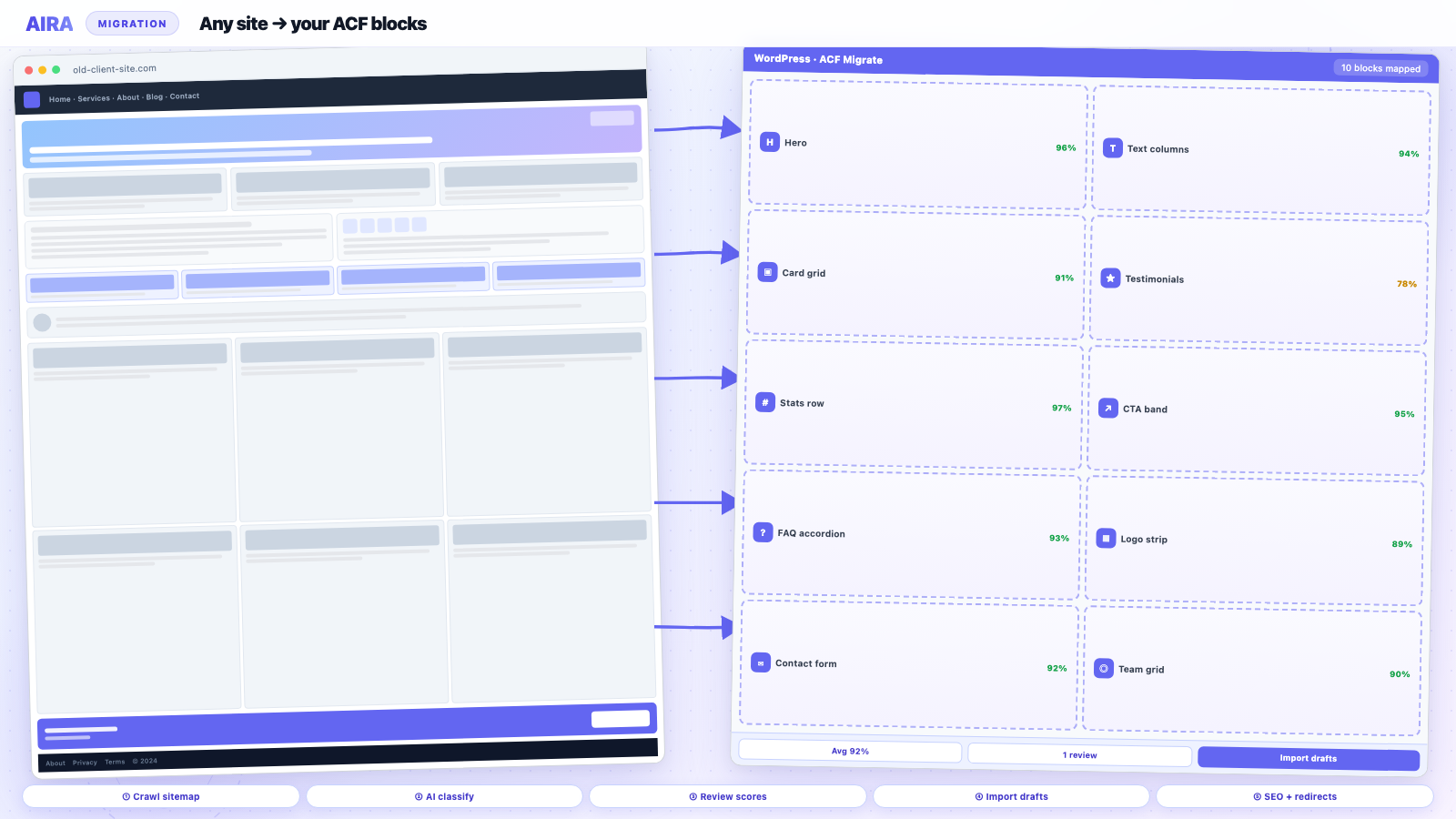
Webflow export is static HTML, not structured CMS fields. Crawl the live site, classify sections into your ACF block library, handle CMS collections separately, and build a redirect map before launch.
Webflow sites arrive at agencies in two ways: the client has outgrown the CMS, or the design was built in Webflow and 'now needs WordPress'. Either way, the hard part is not spinning up WordPress — it is getting every hero, feature grid, testimonial row and CTA band into editable blocks without a week of manual copy-paste. Webflow's native export gives you static HTML/CSS, not structured fields. That is the gap a crawl-and-map workflow fills.
AIRA does not require the source to be WordPress. Point it at the live Webflow URL and it crawls the rendered HTML and classifies sections into your ACF blocks — the same pipeline as Elementor or Divi migrations. This guide covers why export-only falls short, how Webflow sections map to blocks, and the agency workflow from design handover to staging QA.
Why export-only falls short
- arrow_rightWebflow export is static files — no CMS fields, no repeaters, no editor-friendly blocks.
- arrow_rightUdesly or similar converters produce generic WordPress markup, not your ACF block library.
- arrow_rightClient components (sliders, tabs, CMS-driven lists) do not survive as editable Gutenberg blocks.
- arrow_rightInternal links point at .webflow.io URLs until manually rewritten.
- arrow_rightAssets may reference Webflow's CDN — need sideloading to WordPress Media Library.
Webflow sections to ACF blocks
| Webflow section | Typical ACF block | Migration notes |
|---|---|---|
| Hero / banner | Hero block | Heading, subtext, CTA link, background image |
| Feature grid | Cards repeater | Icon, title, body per card |
| Logo strip | Logos repeater | Sideload SVG/PNG assets |
| Testimonial slider | Testimonials repeater | One row per slide, not one blob |
| Stats row | Stats repeater | Number + label fields |
| FAQ accordion | FAQ repeater | Question + answer pairs |
| CMS collection list | Posts grid block | Dynamic WP_Query on new site |
| Rich text section | Text block | Preserve headings and links |
Webflow CMS collections
Webflow CMS items (blog posts, case studies, team members) are not automatically WordPress posts. Decide the mapping early: blog → native posts, case studies → custom post type, team → ACF block repeater on an About page or a Team CPT. Collection pages can be crawled as templates; individual CMS items may need a separate import via Webflow API, CSV, or manual entry depending on volume.
CMS migration options
- arrow_rightWebflow API export — structured JSON for bulk import into WordPress CPTs.
- arrow_rightCSV export from Webflow — map columns to ACF fields on a custom post type.
- arrow_rightCrawl collection item pages — works for small volumes (under 30 items).
- arrow_rightManual entry — viable for team pages with six people; not for 200 blog posts.
URL structure and redirects
Webflow default paths (/blog-post-slug, /about) often change on WordPress (/blog/post-slug, /about-us/). Build a redirect map before launch — Webflow's clean URLs frequently have backlinks you cannot afford to 404. Keep Webflow hosting live until WordPress is verified on staging; maintain redirects from old Webflow paths for at least 90 days post-launch.
Agency workflow
- 1Build ACF block library on WordPress to match (or improve) Webflow components.
- 2Export ACF field groups; generate mapping spec in AIRA.
- 3Crawl live Webflow site (include www and non-www canonical).
- 4Review classifications — Webflow's nested divs sometimes need wrapper sections dropped.
- 5Import marketing pages as drafts; sideload images to Media Library.
- 6Handle CMS collections per your CPT decision.
- 7Set redirects; migrate meta; run QA checklist.
- 8Follow staging workflow through launch.
Design fidelity expectations
Content and structure carry over; pixel-perfect Webflow animations and interactions do not — unless you rebuild them in your theme. Set client expectations early: the win is CMS ownership, editor handover, and the plugin ecosystem (forms, SEO, WooCommerce), not a 1:1 clone of Webflow's interaction designer. Document which interactions you will rebuild (fade-in on scroll) and which you will simplify.
Forms, SEO and integrations
Webflow forms do not migrate — rebuild in Gravity Forms, WPForms, or Fluent Forms on WordPress. SEO metadata from Webflow's page settings needs explicit migration into Yoast or Rank Math — see preserve Yoast SEO. Ecommerce on Webflow is a separate project: product data lives in Webflow's system, not WordPress tables. Most agency projects are marketing-site migrations to WordPress, optionally plus WooCommerce as a new shop build.
Common Webflow migration mistakes
- arrow_rightRelying on Udesly without mapping to your ACF block library.
- arrow_rightTreating CMS collection pages as static — missing dynamic blog/case study content.
- arrow_rightNot sideloading images — broken images after migration.
- arrow_rightLaunching without redirects from Webflow URLs.
- arrow_rightPromising pixel-perfect interactions without scoping the rebuild.
- arrow_rightTaking Webflow offline before staging is verified.
Assets, fonts and media
Webflow serves images and fonts from its own CDN. During crawl-and-map, images sideload into the WordPress Media Library — they should not remain hotlinked to assets.website-files.com after launch. Custom fonts need re-declaring in your theme (@font-face or Adobe Fonts / Google Fonts embed). Document font licensing: a Webflow-hosted font may not be licensed for self-hosted WordPress.
- arrow_rightSideload all raster images (JPG, PNG, WebP) during import.
- arrow_rightSVG logos — enable Safe SVG on WordPress before import.
- arrow_rightBackground images in CSS — check hero block background fields after import.
- arrow_rightVideo embeds — migrate as oEmbed or hosted video block, not Webflow player markup.
- arrow_rightLottie animations — rebuild or replace; do not assume portability.
Scoping a Webflow project for clients
Quote Webflow migrations in three buckets: marketing pages (crawl-and-map), CMS collections (API/CSV/manual), and integrations (forms, analytics, memberships). Marketing pages are predictable. CMS volume drives cost — 200 blog posts is not the same as eight case studies. Interactions and animations are out of scope unless explicitly priced. Present the ACF block library as the destination — clients get editable sections, not a static HTML paste.
Post-launch: decommissioning Webflow
Keep Webflow live for 30–90 days after WordPress launch with redirects in place. Monitor Search Console for Webflow URLs still receiving impressions. Export the Webflow project archive for records before cancelling the subscription. Clients sometimes ask to 'keep Webflow as backup' — explain that two live sites create duplicate-content risk unless one redirects to the other.
Webflow vs WordPress: what clients gain
Frame the migration as capability upgrade, not downgrade. WordPress brings: native SEO plugin ecosystem (Yoast, Rank Math), form plugins (Gravity Forms), WooCommerce for future shop builds, membership plugins, and an editor the client's whole team can use without a Webflow seat. ACF blocks give structured sections — change the hero heading without touching layout code. That message lands better than 'we will recreate your Webflow site in WordPress.'
Multilingual and localisation
Webflow localisation adds complexity — separate URL paths or subdomains per locale. Map each locale to WordPress multilingual setup (WPML, Polylang, or multisite) early in the project. Crawl each locale's URLs separately. Hreflang tags must be recreated on WordPress — they do not migrate automatically from Webflow export.
Review pass on Webflow classifications
Webflow's HTML is semantic but nested. Low-confidence classifications often come from: combined hero + nav sections, tab components split incorrectly, or CMS collection wrappers treated as static text. Sort the review queue by confidence score; fix homepage and top landing pages first. Compare side-by-side with the Webflow live site at desktop and mobile widths.
Analytics and tracking migration
Webflow embeds GA4, GTM, Meta Pixel, and Hotjar in project settings or custom code embeds. Inventory every tracking script before migration. Rebuild GTM container on WordPress — do not copy Webflow's head code blindly. Cookie consent (Cookiebot, OneTrust) must be reconfigured for the new domain. Staging should use a separate GA4 property or filtered view so test traffic does not pollute production analytics.
Staging workflow for Webflow projects
Webflow projects follow the same staging migration workflow as WordPress rebuilds: block library first, crawl live Webflow, import drafts, redirects, SEO, QA, cutover. The source platform differs; the staging discipline does not. Keep webflow.io live until WordPress passes QA. Load redirects on WordPress staging and test with curl before DNS moves.
Preserve Yoast or Rank Math metadata from Webflow page settings during import — titles and descriptions do not transfer unless you map them. Webflow's native SEO fields are per-page; include them in your crawl bundle alongside block content. Pair with a redirect map when WordPress permalink structure differs from Webflow paths. Sideload images during import — Webflow CDN URLs break when the project is decommissioned.
For section mapping patterns, see how to map website sections to ACF blocks and the page builder exit guide. AIRA crawls Webflow the same way it crawls WordPress page builders — rendered HTML in, structured ACF blocks out.
Compare content migration approaches when scoping — Webflow export, Udesly, and crawl-and-map sit at different points on the speed-vs-structure spectrum. Agencies with a standard ACF library almost always land on crawl-and-map.
Run the migration QA checklist on WordPress staging before DNS cutover — Webflow stays live as the fallback until you pass every gate on staging.
What to read next on this platform move
Webflow CMS collections map cleanly to WordPress CPTs — plan registration and ACF field groups using the CPT migration guide before importing collection items. Webflow URL changes always need 301s: redirect map and SEO rebuild checklist. Other platform exits: Wix, Squarespace, Shopify.
Frequently asked questions
Can I migrate Webflow without the client's Webflow account?expand_more
Yes — if the site is publicly reachable, AIRA crawls the rendered front-end. You do not need Webflow dashboard access for content migration, though CMS collection export may need credentials or an API token.
Does Webflow hosting need to stay live during migration?expand_more
Keep it live until WordPress is verified on staging. You need the source URL crawlable until the import bundle is committed. After launch, maintain redirects from old Webflow paths for at least 90 days.
What about Webflow e-commerce?expand_more
Webflow Ecommerce is a different beast — product data lives in Webflow's system, not WordPress tables. Most agency projects are marketing-site migrations to WordPress + WooCommerce, which means a separate product import step, not a page crawl.
How do Webflow CMS blog posts become WordPress posts?expand_more
Export via Webflow API or CSV, then import into native WordPress posts with a CSV importer or custom script. Map Webflow fields (title, slug, body, featured image) to WordPress post fields and Yoast meta. Crawling individual CMS item pages works for small volumes.
Will Webflow animations work on WordPress?expand_more
Not automatically. Webflow interactions are Webflow-specific. Rebuild critical animations in your theme's JS or simplify them. Set client expectations in the proposal — content and layout migrate; interaction designer fidelity does not.
How do I handle Webflow's nested div structure?expand_more
The classifier maps content sections, not every wrapper div. Review low-confidence classifications in the AIRA review UI — Webflow's section > container > row nesting sometimes needs manual block assignment.
Can I use Udesly instead of crawl-and-map?expand_more
Udesly produces WordPress pages from Webflow export, but not your ACF block library with field keys. You still face manual restructuring. Crawl-and-map into your registered blocks is faster for agencies with a standard block library.
What about Webflow's global swatches and styles?expand_more
Design tokens do not migrate. Rebuild colours, typography and spacing in your theme's design system (theme.json, SCSS variables, or block style variants). Content migrates; global styles are a theme build task.
How do I migrate Webflow SEO settings?expand_more
Crawl the old page's title and meta description, or export from Webflow page settings. Write into Yoast or Rank Math fields during import. Include in your bundle mapping alongside block content.
Does AIRA work with password-protected Webflow staging?expand_more
The crawl needs reachable URLs. If Webflow staging is password-protected, use the published .webflow.io subdomain or temporarily remove protection for the crawl pass.

Ryan Hale
Head of Front End Development
Ryan Hale is Head of Front End Development at AIRA, where he leads the team building the engine that migrates WordPress sites into native ACF blocks. He has spent more than a decade building and rebuilding WordPress sites for agencies, with deep, hands-on expertise in Advanced Custom Fields, Gutenberg block development, and large-scale content migrations that protect search rankings. He writes about ACF, moving off page builders like Elementor and Divi, and the practical craft of shipping fast, maintainable WordPress rebuilds.
Reviewed to our editorial guidelines.



