Migrating from Beaver Builder to native Gutenberg & ACF blocks
Leaving Beaver Builder for native Gutenberg and ACF blocks? What breaks on deactivation, module mapping, saved rows, and the full agency migration workflow.
verifiedReviewed by Tommy Smith,Content Director
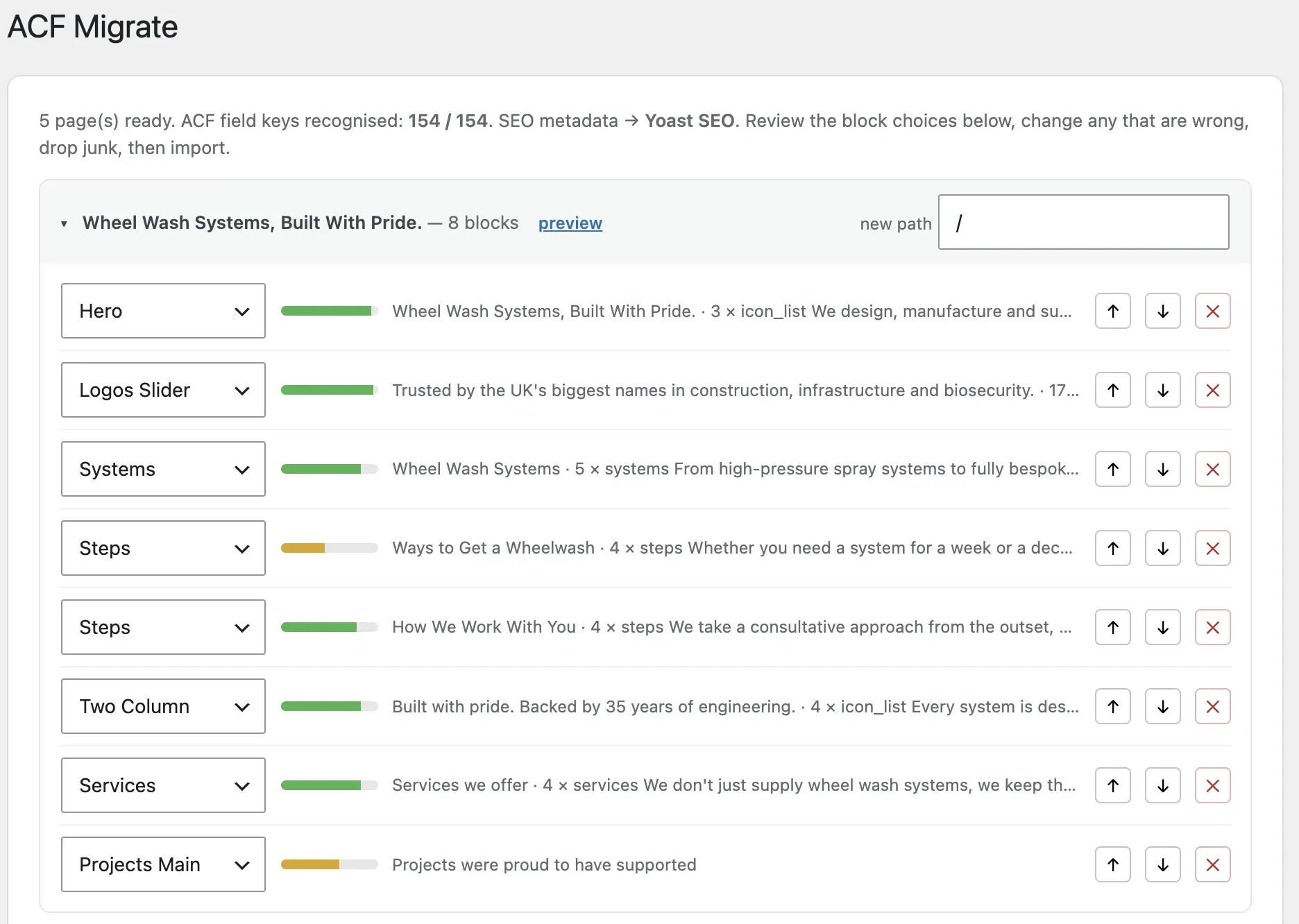
Beaver Builder stores layout in _fl_builder_data post meta. Crawl rendered pages while Beaver is active, map modules to ACF blocks, handle Saved Rows separately, and deactivate only after QA.
Beaver Builder is lighter than Elementor or Divi, but it is still a page builder — layouts live in serialised post meta (_fl_builder_data), not in native Gutenberg blocks. Agencies that standardise on ACF blocks for client rebuilds need a deliberate migration path, not a plugin swap.
The failure mode with Beaver is particularly cruel: unlike WPBakery's visible shortcodes, deactivating Beaver often leaves completely blank pages — not a wall of [fl_builder] tags you can search for. That makes staging spot-checks deceptive if you only open Gutenberg-built pages. This guide covers what breaks, how modules map to blocks, and the workflow we use.
What breaks if you just remove Beaver Builder
Deactivate Beaver Builder and pages built with it typically show nothing useful — the content is not in post_content as readable HTML, it is in builder data that only Beaver's renderer understands. Unlike WPBakery's visible shortcodes, the failure mode here is often a completely blank page, which makes the problem easy to miss on a staging spot-check if you only open Gutenberg-built pages.
Why teams leave Beaver Builder for ACF blocks
- arrow_rightConsistent editor: one Gutenberg experience across every page, no front-end builder overlay.
- arrow_rightTighter output: your PHP templates control markup instead of Beaver's row/column wrappers.
- arrow_rightPortfolio economics: ACF block libraries reuse across clients; per-site builder licences do not.
- arrow_rightMigration-ready structure: field-driven blocks are what automated classifiers map into — builder meta is not.
- arrow_rightPerformance: remove Beaver's CSS/JS payload from every page load.
How Beaver Builder stores content
| Storage | What it holds | Migration approach |
|---|---|---|
| _fl_builder_data | Serialised layout JSON in post meta | Ignore — crawl rendered HTML |
| _fl_builder_enabled | Flag that page uses Beaver | Use to identify pages in URL inventory |
| Saved Rows / Templates | Reusable layout fragments | Inventory separately; crawl pages that use them |
| Beaver Themer | Headers, footers, parts | Rebuild as theme template parts |
| Global settings | Default row/column styles | Rebuild in theme — do not migrate |
Beaver Builder modules to ACF blocks mapping
| Beaver Builder module | Typical ACF block | Watch out for |
|---|---|---|
| Row / Column | Skip or section wrapper | Content modules inside are what matter |
| Photo / Slideshow | Hero or gallery block | Each slide = repeater row |
| Heading / Text Editor | Text or hero block | Heading level matters for SEO |
| Button | CTA block | Link field + label |
| Icon Group | Features block | One repeater row per icon |
| Testimonials | Testimonial block | Avatar images need sideloading |
| Pricing Table | Pricing block | Repeater per tier |
| HTML / Shortcode | Manual review | Often embeds or tracking code |
Saved rows, templates and global headers
Beaver Builder's Saved Rows and Templates are reusable layout fragments. They render on any page that imports them, but the source of truth is in Beaver's admin — not obvious when you are looking at a single page in the WordPress editor. When you crawl, the rendered page includes them. When you audit, list which saved rows appear on more than one URL so you do not pay to review the same footer CTA twelve times.
Beaver Themer (if installed) adds header, footer and part layouts similar to Elementor Theme Builder. Audit these separately from page content — your new theme's template parts must replace them before you remove Beaver.
Step-by-step migration workflow
- 1Export a full URL list; identify Beaver-built pages (_fl_builder_enabled meta or front-end inspect).
- 2Register ACF blocks; export field groups as JSON.
- 3Crawl every Beaver page on the live site — not the builder's back-end preview URL.
- 4Classify modules into blocks; queue HTML/Shortcode modules for manual handling.
- 5Import as drafts; verify images in Media Library and internal links.
- 6Rebuild Themer templates (header, footer) in new theme.
- 7Run migration QA on staging.
- 8Deactivate Beaver Builder and Themer after sign-off.
Beaver vs Elementor: migration differences
Both store layout in post meta and require front-end crawling. Beaver's output is typically leaner — fewer wrapper divs — which can mean higher classifier confidence. Elementor has more module types and denser nesting. The workflow is identical: crawl, classify, review, import. See Elementor migration for parallel patterns.
Beaver Builder Lite vs Pro
Beaver Builder Lite (bundled with some themes) has fewer modules than Pro. Audit which modules the site actually uses before building your ACF block library — you may not need a pricing table block if no page uses one. Pro-only modules (login form, posts carousel, WooCommerce modules) need explicit mapping decisions. WooCommerce modules are dynamic — wire to live queries on the new site.
Multisite and agency reseller accounts
Agencies running Beaver on multisite or reseller licences often rebuild to escape per-site licence management. ACF block libraries shared across a portfolio replace per-client Beaver customisations. Document which Beaver templates were global across subsites — each may need the same theme template part on the new network.
Common Beaver Builder migration mistakes
- arrow_rightSpot-checking only blog posts — Beaver pages are blank, posts may look fine.
- arrow_rightMigrating Saved Row content repeatedly instead of once as a shared block.
- arrow_rightForgetting Beaver Themer headers and footers.
- arrow_rightLeaving HTML modules with tracking scripts unreviewed.
- arrow_rightDeactivating Beaver before Themer replacements exist.
- arrow_rightNot running broken images check after sideload.
Pricing and scoping Beaver migrations
Beaver sites are often 20–50 pages with moderate complexity. Quote migration separately from design and theme build. Show the maths: 40 pages at 2 hours manual = 80 hours versus 40 pages at 15 minutes review = 10 hours. Beaver Themer adds template rebuild time — header, footer, and archive templates are development line items, not migration line items. See how to scope and price a rebuild.
Post-migration: editor training
Beaver clients are used to front-end drag-and-drop. Gutenberg with ACF sidebar fields feels different. Run a 30-minute staging walkthrough: insert a hero block, edit a repeater row, preview, publish. Provide a one-page block guide. The first week post-launch expect support tickets — budget two hours of handover support in the project scope.
Identifying Beaver-built pages in the database
Query wp_postmeta for _fl_builder_enabled = 1 to list Beaver pages. Cross-reference with your sitemap and analytics — some pages may have been built in Beaver then partially edited in Gutenberg. Hybrid pages need manual inspection: the crawl captures rendered output regardless of which editor last saved. Beaver Themer layouts do not set _fl_builder_enabled on every page they affect — audit Themer separately.
SEO preservation on Beaver migrations
Beaver sites use Yoast or Rank Math like any WordPress build. Migrate titles and descriptions with the content bundle — see preserve Yoast SEO. Beaver does not store SEO data in builder meta; it is in the same post meta keys as a standard WordPress site. If URLs change when you restructure services pages, load a redirect map before deactivating Beaver.
Performance gains after leaving Beaver
Beaver is lighter than Elementor but still ships builder CSS and JS on every page. Removing Beaver and rendering through ACF block templates typically improves LCP and reduces DOM size. Run Lighthouse on the homepage before and after on the same hosting — the screenshot is your client pitch for the rebuild. See page builder performance problems for metric framing.
Staging and launch sequence
- 1Import all Beaver pages as drafts on staging.
- 2Rebuild Themer templates in new theme.
- 3Editor review and publish on staging.
- 4Load redirects; verify SEO meta.
- 5Run full migration QA.
- 6Deactivate Beaver on staging; confirm no blank pages.
- 7Cutover production; monitor post-launch.
Beaver migrations benefit from the same staging workflow as every builder exit. Never deactivate Beaver on production until staging proves every page renders from ACF blocks alone. The blank-page failure mode is silent — your QA checklist must include every URL from the sitemap, not just the pages the client remembers.
Module edge cases
- arrow_rightContact form module — rebuild in Gravity Forms; map fields to match old submissions.
- arrow_rightPosts module / Posts carousel — dynamic WP_Query block on new theme.
- arrow_rightMap module — Google Maps embed or ACF map field with API key on new site.
- arrow_rightMenu module — rebuild as WordPress nav menu, not ACF block content.
- arrow_rightSidebar module — widget area or block template part in new theme.
- arrow_rightSubscribe form — Mailchimp/ConvertKit embed or form plugin integration.
Slideshow and Photo modules are where broken images cluster — every slide needs sideloading into the Media Library, not a hotlinked URL from the old uploads folder. Verify repeater row image fields in the editor after import, not just the front-end preview.
Preserve Yoast SEO metadata during Beaver migrations — builder removal does not affect post meta, but a fresh install without explicit mapping does. Include SEO fields in your bundle alongside block content.
Load a redirect map before deactivating Beaver if any marketing URLs change during the rebuild. Beaver pages often have clean slugs — preserve them unless the information architecture deliberately shifts during the project.
AIRA handles the crawl-and-classify stages against your ACF export — the same pipeline used for Elementor and WPBakery migrations. Pair with the WordPress migration checklist and post-launch monitoring plan.
What to read next on this rebuild
Beaver Builder stores layout in postmeta like Elementor — the rendered-page crawl approach in this guide still applies. For WooCommerce sites on Beaver, product templates are separate from page migration; see WooCommerce ACF rebuild. Do not skip media library migration — Beaver image modules often embed attachment IDs that break after import.
Frequently asked questions
Does Beaver Builder store content differently from Elementor?expand_more
Yes. Elementor uses _elementor_data post meta; Beaver Builder uses _fl_builder_data. Both require migrating from the rendered front-end page rather than the raw meta — the visible HTML is what you map into ACF blocks.
Can I export Beaver Builder layouts and import them into ACF?expand_more
Beaver's own export/import moves layouts between Beaver installs. It does not produce native Gutenberg blocks or ACF field values. For a rebuild on ACF blocks, you need section-by-section mapping from the live rendered page.
Why are my Beaver pages blank instead of showing shortcodes?expand_more
Beaver stores layout in post meta, not as shortcodes in post_content. Deactivating the plugin leaves empty content areas — not visible [fl_builder] tags. That is why a front-end crawl while Beaver is still active is essential before you switch it off.
How do I find all Beaver-built pages?expand_more
Query post meta for _fl_builder_enabled, export your sitemap, or use a plugin like Beaver Builder's own page list. Cross-reference with analytics for high-traffic pages you cannot afford to miss.
What about Beaver Themer templates?expand_more
Rebuild as theme template parts — header.php, footer.php, archive templates. Themer layouts are not page content; they will not land in ACF blocks on individual pages.
Are Saved Rows migrated automatically?expand_more
Saved Rows render inside pages that reference them. A page crawl captures the rendered output. Inventory Saved Rows in Beaver admin to avoid reviewing duplicate footer CTAs across twelve URLs as separate migration work.
Is Beaver Builder faster to migrate than Elementor?expand_more
Often slightly — cleaner HTML means better classification confidence. But page count and layout complexity matter more than the builder brand. A dense Beaver homepage still needs careful review.
Can I run Beaver and ACF blocks side by side?expand_more
During transition, yes. Long-term, no — two systems doubles maintenance. Migrate all Beaver pages, replace Themer templates, then deactivate Beaver in one cutover after staging QA.
How do I handle Beaver HTML modules?expand_more
Manual review. HTML modules often contain embed codes, tracking scripts, or third-party widgets. Do not auto-import blindly — verify each one and rebuild in appropriate blocks or theme partials.
Does AIRA support Beaver Builder migrations?expand_more
Yes. Crawl the live site while Beaver is active, upload your ACF JSON export, and AIRA classifies rendered sections into your block library with confidence scores for review.

Ryan Hale
Head of Front End Development
Ryan Hale is Head of Front End Development at AIRA, where he leads the team building the engine that migrates WordPress sites into native ACF blocks. He has spent more than a decade building and rebuilding WordPress sites for agencies, with deep, hands-on expertise in Advanced Custom Fields, Gutenberg block development, and large-scale content migrations that protect search rankings. He writes about ACF, moving off page builders like Elementor and Divi, and the practical craft of shipping fast, maintainable WordPress rebuilds.
Reviewed to our editorial guidelines.



