How long does a WordPress site rebuild take?
How long does a WordPress rebuild take? Agency timelines for design, ACF blocks, content migration, QA and launch — plus what makes a 40-page site take two…
verifiedReviewed by Tommy Smith,Content Director

A typical agency WordPress rebuild runs 4–8 weeks for a 30–60 page site: 2–3 weeks design and block library, 2–3 weeks theme build, 1–2 days to two weeks for content migration depending on method, then 3–5 days QA and launch. Content migration is the main variable.
'How long will the rebuild take?' is the question that decides whether you win the project — and whether you finish it on margin. Clients hear 'rebuild' and picture a fresh coat of paint. Agencies know it is design, block development, content migration, SEO preservation, QA and a launch that cannot slip because redirects were an afterthought. The honest answer depends less on design than most clients think, and far more on what is already on the site and how you plan to move it.
This guide breaks down realistic timelines by phase, site size and source builder. Use it to quote confidently, set client expectations early, and spot the dependencies that blow budgets before they become your problem.
The five phases every rebuild passes through
Whether you are rebuilding five pages or five hundred, the work moves through the same stages. Skipping or compressing one phase does not remove the work — it just moves it to post-launch, usually as a traffic dip, a client complaint or an unpaid fix pass.
- 1Discovery and scoping — inventory the old site, confirm the stack, agree URL structure and block library.
- 2Design and block library — wireframes, component design, ACF field groups registered on staging.
- 3Theme build and templates — header, footer, archives, singles, any WooCommerce or custom post type templates.
- 4Content migration — crawl, classify, import as drafts, client review.
- 5QA, SEO and launch — redirects, metadata, link checks, forms, performance, go-live and monitoring.
Typical durations by site size
These ranges assume an agency workflow with ACF blocks, a staging environment and a single round of client amends. Multilingual sites, ecommerce and heavy integrations sit at the top of each range.
| Phase | Small (10–20 pages) | Medium (30–60 pages) | Large (80+ pages) |
|---|---|---|---|
| Design & block library | 1–2 weeks | 2–3 weeks | 3–4 weeks |
| Theme build & templates | 1–2 weeks | 2–3 weeks | 3–5 weeks |
| Content migration (manual) | 1–3 days | 3–10 days | 2–4 weeks |
| Content migration (mapped) | Half day | 1–2 days | 3–5 days |
| QA, SEO & launch | 2–3 days | 3–5 days | 1–2 weeks |
Add one to two weeks of post-launch monitoring — not because the site is unfinished, but because Search Console, redirect edge cases and client-reported quirks surface in the first month. Budget it in the proposal so 'we are done on launch day' does not become a support ticket avalanche.
Why content migration is the wildcard
Design and development are predictable. You have done them before, you know your hourly rate, and scope creep is visible in Figma. Content migration is different because it depends entirely on the source: a Classic Editor blog migrates in hours; a 40-page Elementor site at two to three hours per page is two weeks before QA even starts.
| Source | Manual (per page) | Mapped + review (per page) | Notes |
|---|---|---|---|
| Classic Editor HTML | 30–60 min | 5–10 min | Blog posts faster than layout pages |
| Elementor / Divi | 2–4 hours | 10–20 min | Dense homepages take longer |
| WPBakery / Avada | 2–3 hours | 10–20 min | Nested shortcodes add review time |
| ACF flexible content | 1–2 hours | 5–15 min | Already structured — faster map |
| Oxygen / Bricks | 1–3 hours | 10–20 min | Cleaner HTML helps classification |
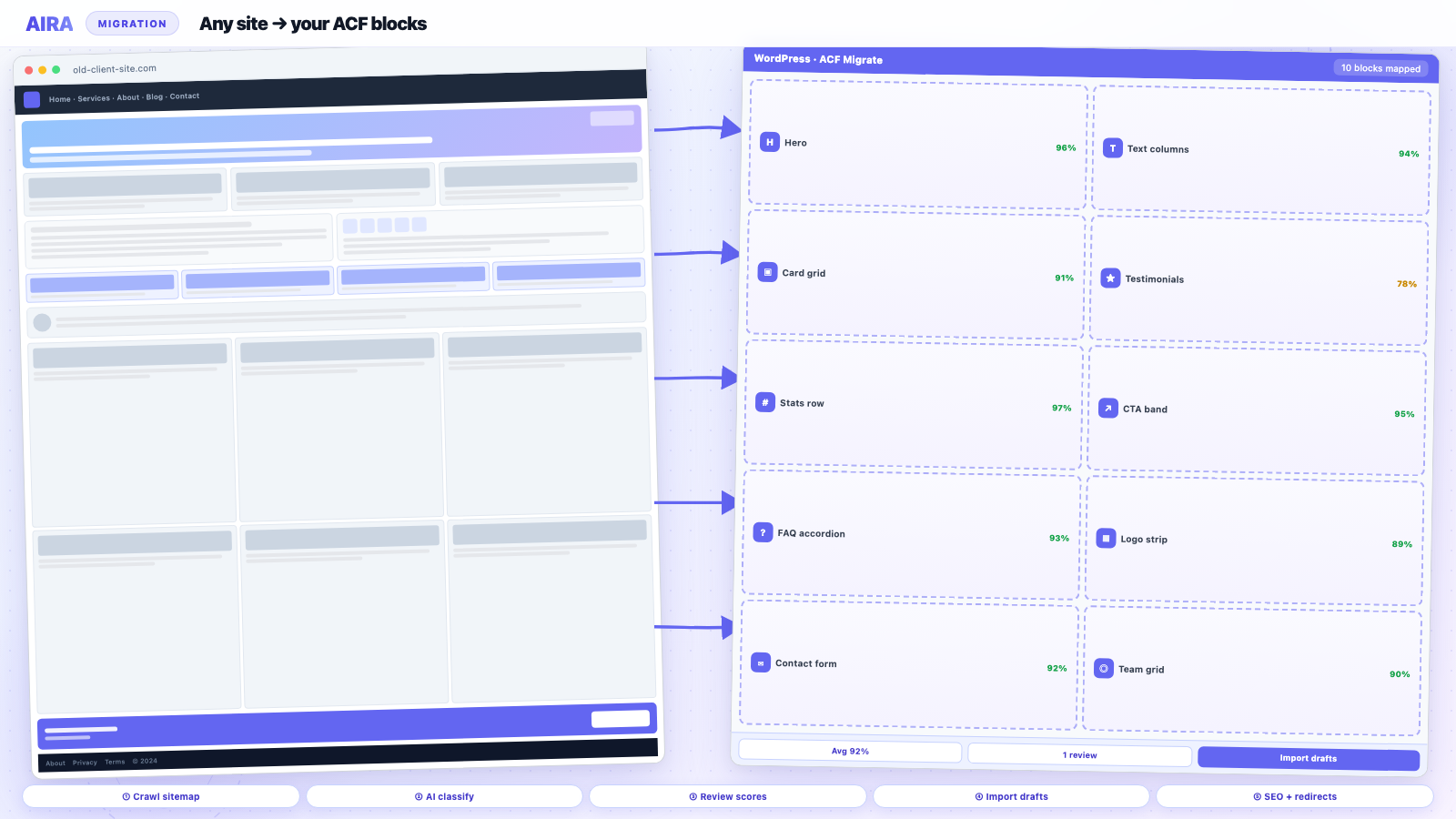
The same 40-page Elementor site that blocks a developer for two days of manual work can move from crawl to reviewed drafts in an afternoon when sections are classified against your ACF JSON export. That is not magic — it is replacing a build-from-scratch step with a review step. See content migration approaches compared for when each method fits.
What adds hidden time to quotes
Under-quoted rebuilds almost always fail in the same places. Flag these in discovery, not in week six of the project.
- arrow_rightForms and CRM integrations — Gravity Forms, HubSpot embeds and custom handlers need retesting, not just visual QA.
- arrow_rightEcommerce — checkout, cart fragments, product grids and payment gateways add days beyond marketing pages.
- arrow_rightMultilingual content — WPML or Polylang doubles migration and redirect work.
- arrow_rightCustom schema and structured data — Organisation, Product, FAQ and LocalBusiness markup must be rebuilt, not assumed.
- arrow_rightClient content review cycles — 'one round of amends' rarely means one round; build buffer.
- arrow_rightLegal and compliance sign-off — finance, healthcare and regulated sectors add calendar time, not just dev hours.
- arrow_rightRedirect mapping and SEO preservation — often treated as optional until rankings move. Budget 1–3 days on a medium site. See rebuild without losing SEO.
Talking to clients about timeline
Clients want a single date. Agencies need a range with dependencies. The compromise that wins projects and protects margin: separate line items with clear assumptions.
- arrow_rightShow phases explicitly: design, development, migration, QA, launch, monitoring.
- arrow_rightAsk about page builder before quoting migration — 'WordPress site' is not enough detail.
- arrow_rightExplain that migration depends on what is on the site today, not what the new design looks like.
- arrow_rightSet expectation that launch is the start of verification, not the end of the project.
- arrow_rightDocument dependencies: client content approval, third-party API access, DNS cutover window.
The design is what users notice on day one. The migration is what protects the traffic that pays for it.
How agencies compress the timeline
You cannot design and migrate in parallel on day one — but you can overlap work once the block library exists on staging. That is the biggest legitimate compression lever.
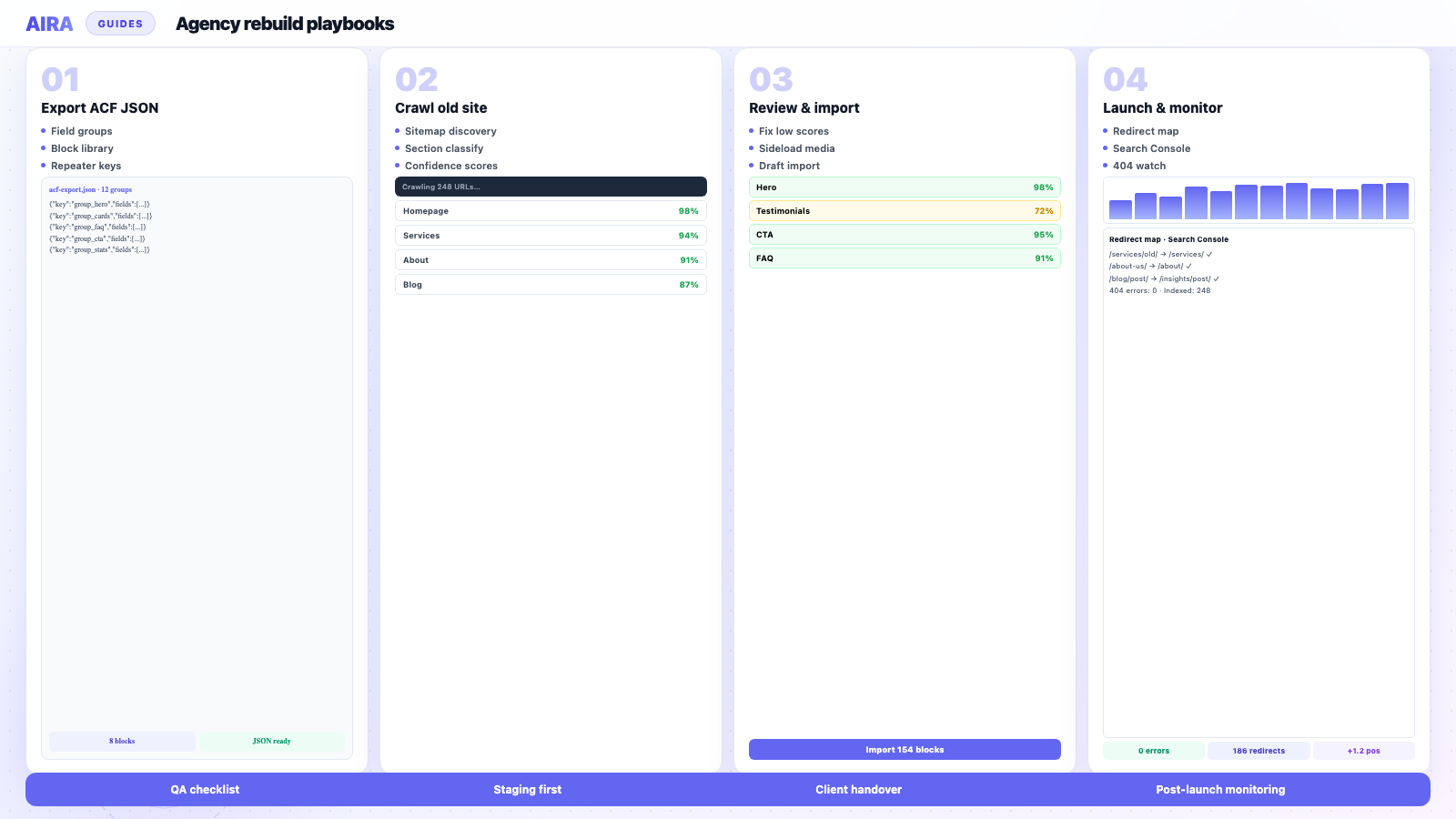
- 1Register the ACF block library early so migration can start while polish continues.
- 2Export field groups as JSON before design sign-off — ACF JSON export explained covers why this matters.
- 3Crawl and classify on staging in parallel with design QA; do not wait for pixel-perfect.
- 4Import as drafts so editors review pages incrementally, not in one big bang.
- 5Run the staging workflow and migration checklist so launch does not slip because redirects were not ready.
- 6Use the QA checklist as your pre-launch scope reference, not an afterthought.
Sample timeline: 40-page Elementor site to ACF blocks
A realistic eight-week plan for a mid-market client — marketing site, no ecommerce, one round of design amends, crawl-and-map migration.
- 1Weeks 1–2: Discovery, sitemap inventory, URL mapping, ACF block library design.
- 2Weeks 3–4: Theme build, template parts, block registration on staging.
- 3Week 5: Crawl old site, classify sections, import drafts, internal link rewrite.
- 4Week 6: Client content review on staging, amends to low-confidence pages.
- 5Week 7: Redirect map, metadata preservation, broken link crawl, forms and mobile QA.
- 6Week 8: Launch, sitemap submission, post-launch monitoring begins.
The manual alternative — same scope, same quality bar — often runs twelve to fourteen weeks because migration alone consumes three to four. That is the conversation worth having in the pitch.
When to say no to a fixed date
Fixed launch dates work when scope is fixed. They fail when the client adds pages mid-project, the old site turns out to be 120 pages of Fusion Builder demos, or legal has not approved copy. Tie the date to a signed sitemap and a completed inventory — and keep a written change-order process for anything outside it.
Teams using AI-assisted classification against their ACF export typically move a 40-page site from crawl to reviewed drafts in an afternoon. The AI and WordPress content migration guide explains where automation helps and where human review stays essential.
Timeline variables by project type
Brochure marketing sites
The ranges in this guide assume a standard agency marketing site: services, about, team, case studies, contact, blog. No checkout, no logged-in areas, no complex faceted search. That is the majority of WordPress rebuilds agencies quote — and the majority where migration time dominates if the source is Elementor or Avada.
WooCommerce and membership
Add two to four weeks minimum for ecommerce: product migration, attribute and variation QA, cart and checkout on production payment gateways, email notifications, and schema for Product and Offer. Membership plugins add role-based content checks and subscription flows that marketing-page migration guides do not cover. Quote these as separate workstreams with their own QA checklist items.
Content freeze and client review
Clients often assume they can edit copy on the old site until launch day. That doubles migration work. Agree a content freeze date — after which changes happen on staging only — and a single consolidated review round with named approvers. Every 'quick text tweak' on the live old site after crawl means re-diffing that page on staging.
Red flags that blow the timeline
- arrow_rightNo sitemap or Analytics access at proposal stage — you are guessing page count.
- arrow_rightOld site is larger than quoted — 40 pages quoted, 90 discovered in crawl.
- arrow_rightUndocumented custom post types and landing page templates.
- arrow_rightThird-party booking, CRM or LMS integrations discovered in week three.
- arrow_rightClient wants URL changes on high-traffic pages without accepting redirect planning time.
- arrow_rightNo staging environment until week four.
Each red flag is a change-order conversation, not a silent absorb. The migration checklist inventory stage exists partly to surface these before design locks.
SOW language that protects your timeline
Write assumptions explicitly: page count from signed sitemap, one round of design amends, one consolidated content review, client provides brand assets by week two, third-party API credentials by week three. Migration method (manual vs mapped) named in scope. Post-launch monitoring duration stated in weeks, not implied. Vague SOWs become unpaid migration weekends — especially when the old site turns out to be Avada demo import plus forty client pages nobody counted.
From proposal to kick-off
Timeline accuracy starts before contract signature. Run a lightweight crawl of the live site in the sales phase — even ten minutes in Screaming Frog surfaces true page count, redirect chains, and whether the stack is Elementor, Avada or plain Gutenberg. Pair that with Analytics landing page report for the top twenty URLs. Those two exports anchor every phase estimate in data instead of client memory ('we have about thirty pages'). Under-counting at proposal is the leading cause of migration margin loss; over-counting loses the pitch. Aim for verified count plus ten percent buffer for discovered archives and campaign landing pages.
Build a Gantt with migration as its own swim lane, not a tail on development. Clients see parallel work; your team sees when block library deadline blocks crawl start.
Frequently asked questions
How long does a WordPress site rebuild take for a small business site?expand_more
A 10–20 page marketing site typically takes four to six weeks end to end: one to two weeks design and blocks, one to two weeks build, one to three days migration if mapped, then two to three days QA and launch. Manual migration on a page-builder source can add a full week.
How long should I budget for SEO preservation?expand_more
Redirect mapping and metadata verification add one to three days on a medium site when done properly. Skipping it does not save time — it costs rankings for weeks. Build it into the QA phase using the rebuild-without-losing-SEO checklist, not as an optional extra.
Can content migration run in parallel with development?expand_more
Yes, once the block library is registered on staging. You do not need final design approval to migrate content into drafts — only the block structure. Editors review and publish when the theme is ready.
What is the biggest cause of timeline overruns?expand_more
Content migration on page-builder sites, almost always. Elementor, Divi, WPBakery and Avada pages do not copy across — they must be re-mapped section by section. Quote per-page maths in the proposal so the risk is visible upfront.
How long does manual content migration take per page?expand_more
Classic Editor pages: 30–60 minutes. Elementor or Divi layout pages: two to four hours. WPBakery or Avada: two to three hours. Mapped migration with review: typically 10–20 minutes per page on builder sources.
Should post-launch monitoring be in the project timeline?expand_more
Yes. Budget one to two weeks of active monitoring after launch — Search Console, redirect spot-checks, client-reported issues. Rankings and crawl errors surface in the first month, not on launch day.
How does site size affect design time vs migration time?expand_more
Design and block library scale sub-linearly — a 60-page site does not need three times the components of a 20-page site. Migration scales linearly with page count and builder complexity. That is why large sites feel 'fast' on design and 'slow' on content.
What questions should I ask before quoting a rebuild timeline?expand_more
What page builder or theme is in use? How many indexable URLs? Are URLs changing? Is there ecommerce, multilingual content or custom post types? Who approves content and how many review rounds? Answers change the migration estimate more than the design estimate.
Can AI shorten the migration phase?expand_more
Yes — when AI classifies rendered sections into your ACF block library with confidence scores and human review. It replaces manual rebuilding, not QA. Deterministic steps (crawl, sideload, redirect map) still run the same way every time.
What adds hidden time to rebuild quotes?expand_more
Forms and CRM integrations, ecommerce checkout testing, multilingual content, custom schema, client review cycles, and under-scoped redirect mapping. Use the migration QA checklist as your scope reference when estimating the launch phase.

Ryan Hale
Head of Front End Development
Ryan Hale is Head of Front End Development at AIRA, where he leads the team building the engine that migrates WordPress sites into native ACF blocks. He has spent more than a decade building and rebuilding WordPress sites for agencies, with deep, hands-on expertise in Advanced Custom Fields, Gutenberg block development, and large-scale content migrations that protect search rankings. He writes about ACF, moving off page builders like Elementor and Divi, and the practical craft of shipping fast, maintainable WordPress rebuilds.
Reviewed to our editorial guidelines.